
AWS
What Is Amazon CloudFront? How It Works, Caching, Pricing and AWS Architecture
By Sagar Panwar · · 28 min read

When I first started working with AWS, Amazon CloudFront was one of those services that was easy to understand at a high level. It is a Content Delivery Network (CDN). It has servers around the world. It delivers content closer to users and makes websites load faster.
That explanation is correct, but it doesn't tell us much about how CloudFront actually works.
For example, what happens when a user requests a file that CloudFront hasn't cached yet? Does it store a copy permanently? How does it decide whether to cache an API response? What is the difference between an origin and a distribution? And why do we sometimes need a cache policy, an origin request policy and an Origin Access Control?
I wanted to go beyond the usual definition of a CDN and understand the engineering behind it.
This becomes particularly important when we use CloudFront in a real application architecture, such as hosting a frontend on Amazon S3, serving images, or routing API requests to a backend.
In this article, I'll try to explain Amazon CloudFront from the basics to practical architecture decisions, using examples that make sense when building and deploying applications.
1. What is Amazon CloudFront?
Amazon CloudFront is a Content Delivery Network (CDN) provided by Amazon Web Services. It delivers website content, images, videos and application responses through a global network of edge locations.
Instead of every user requesting content directly from your origin server, CloudFront can serve eligible content from a location closer to that user. This reduces the distance data needs to travel, improves response times and reduces repeated requests to your origin.
Let's understand this with an example.
Imagine your application is hosted on an EC2 instance in Mumbai, India. A user in Mumbai requests your website. The application responds from a server relatively close to that user.
Now imagine another user opens the same website from London. Without a CDN, that request may need to travel all the way to your server in Mumbai and back.
As the number of users increases, your origin server may also need to handle more repeated requests for the same files.
CloudFront helps address this problem.
It maintains a global network of edge locations that can temporarily cache eligible content. When a user requests content, CloudFront routes the request to an edge location that can best serve it, typically based on network latency.
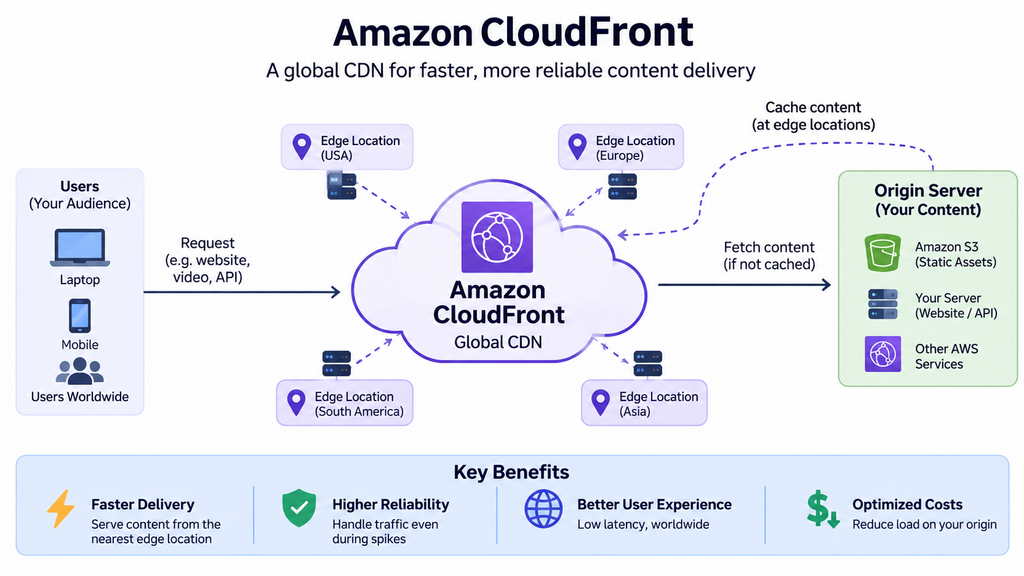
The important point is that CloudFront does not replace your application server or storage service. Your original content still lives somewhere. CloudFront sits between your users and that original source, helping deliver content efficiently.
Official reference: What is Amazon CloudFront?
2. Why do we need a CDN?
Before understanding CloudFront, it helps to understand the problem a CDN solves.
Consider a typical web application. It may contain:
- HTML pages
- JavaScript and CSS files
- Images and product photographs
- Videos and downloadable documents
- API endpoints
Some of these resources change very rarely. Others change frequently or are generated dynamically for individual users. Without a CDN, users generally request content from the application's origin infrastructure. This creates a few challenges.
- Geographical distance: A user far away from your server may experience additional network latency.
- Repeated requests: The same image, CSS file or JavaScript bundle may be requested by thousands of users. Fetching it from your origin every time is unnecessary.
- Origin workload: Every request that reaches your application server consumes some of its resources.
- Traffic spikes: A successful campaign, product launch or viral post may suddenly increase the number of requests.
A CDN helps by caching suitable content and serving it from locations closer to users. This is not a replacement for scaling your backend. It is a way to avoid making your backend handle work that can be served from the CDN.
3. Understanding the core components of CloudFront
Before looking at the request flow, let's understand a few terms used throughout CloudFront.
Distribution
A distribution is the configuration that tells CloudFront how to deliver your content. You define things such as:
- Where the original content lives.
- Which requests should go to which origins.
- How content should be cached.
- Whether HTTPS is required.
- Which HTTP methods are allowed.
- Whether access should be restricted.
When you create a distribution, CloudFront provides a domain name similar to:
You can use this domain directly or connect it to your own domain, such as:
Think of a distribution as the entry point and configuration for delivering your application through CloudFront.
Origin
An origin is the source from which CloudFront retrieves content when it cannot serve a valid cached response. An origin could be:
| Origin | Typical use |
|---|---|
| Amazon S3 | Images, documents and static frontend files |
| Amazon EC2 | Application hosted on a virtual server |
| Application Load Balancer | Backend applications running across multiple instances |
| API Gateway | Managed API endpoints |
| Custom HTTP server | An existing application or external web server |
A distribution can have multiple origins. For example, your frontend files can come from S3 while API requests are forwarded to API Gateway.
Edge location
An edge location is a CloudFront point of presence (POP) that handles requests from users. CloudFront uses DNS and its network infrastructure to route requests to a POP that can best serve the request, typically the nearest one in terms of latency. It checks whether the requested content is available in its cache. If a valid copy is available, CloudFront can return it without contacting the origin.
Regional edge cache
There is another component worth understanding: the regional edge cache. It sits between the individual edge locations and the origin. Imagine a particular image is requested frequently from several nearby edge locations, but not frequently enough to remain in every individual edge cache. A regional edge cache can retain the object for those edge locations, reducing the need to retrieve it repeatedly from the origin.
The simplified hierarchy looks like this:
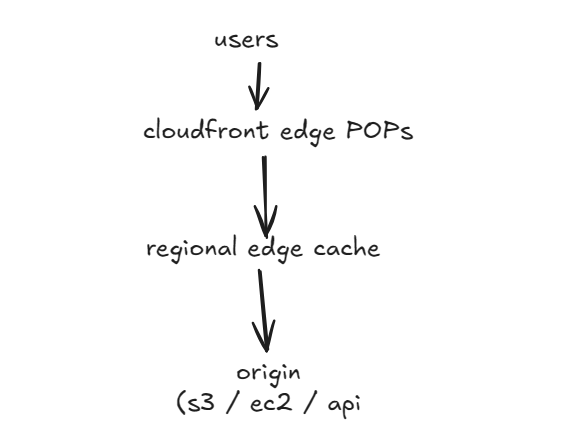
This is a simplified view. The exact request path depends on the cache state and CloudFront configuration.
One important detail: cached content is not permanently stored at every edge location. CloudFront can remove less frequently requested content to make room for other objects, even before the configured TTL expires.
Reference: How CloudFront delivers content
4. How does Amazon CloudFront work?
Let's walk through what happens when someone visits a website configured with CloudFront.
Suppose your website is:
https://www.example.comAnd your frontend files are stored in an S3 bucket.
Step 1: User requests the website
A user opens the website in their browser. The domain is configured to route requests to your CloudFront distribution.
Step 2: Request reaches an edge location
CloudFront routes the request to an appropriate edge location. The selected location is typically close to the user in terms of network latency.
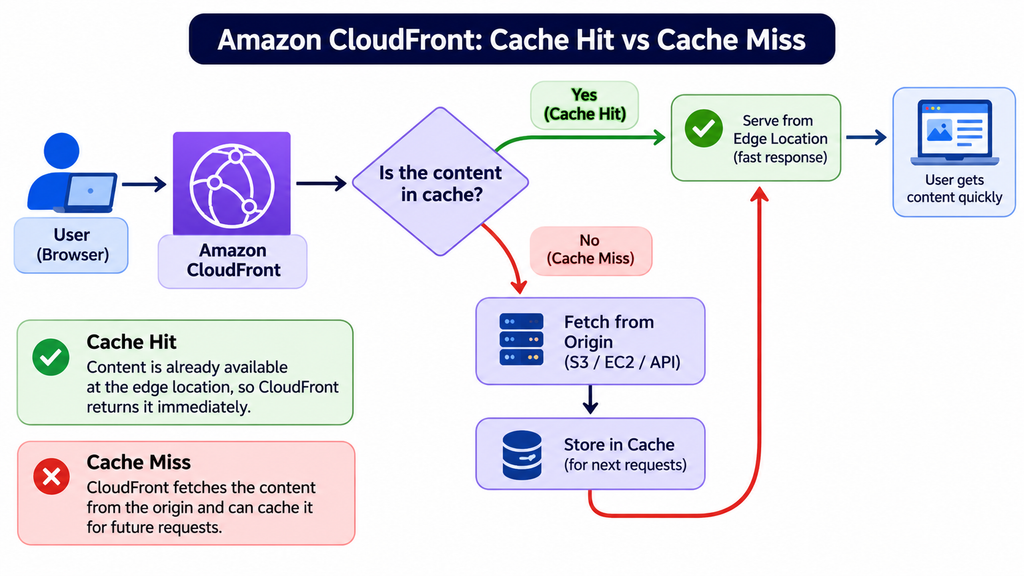
Step 3: CloudFront checks its cache
CloudFront checks whether it has a valid cached object that matches the request. There are two possible outcomes.
Scenario A: Cache hit
The requested object is already available and valid in the edge cache. CloudFront returns it directly to the user. The origin does not need to be contacted for that request.
Scenario B: Cache miss
The requested object is not available in the relevant cache. CloudFront forwards the request towards the origin, potentially using a regional edge cache along the way. The origin responds with the requested content. CloudFront starts forwarding the response to the user and can cache the object for future requests, depending on the caching configuration and response.
Step 4: The next request can be served from the cache
When another user requests the same cacheable object, CloudFront may serve it directly from the cache. This is the main advantage of a CDN. The origin does not need to repeatedly generate or transfer the same content for every user.
5. What is the difference between a cache hit and a cache miss?
These two terms are important when working with CloudFront.
- A cache hit happens when CloudFront finds a valid object matching the incoming request in its cache.
- A cache miss happens when it cannot find a valid matching object and needs to retrieve the content from the origin or another cache layer.
For example, assume your website has this image:
https://www.example.com/images/product-1.jpg- The first user requests it.
- CloudFront does not have the object cached, so it fetches the image from S3.
- The next user requests the same image through the same cache key and while the object is still valid.
- CloudFront can return it directly from its cache.
You may see a response header such as:
X-Cache: Hit from cloudfrontOr:
X-Cache: Miss from cloudfrontThese headers are useful when troubleshooting whether a request is being served from the cache or reaching the origin.
What is a cache hit ratio?
The cache hit ratio tells us what proportion of eligible requests CloudFront serves from its cache.
For example:
Suppose CloudFront receives 1,000 requests for cacheable objects.
- 800 requests are cache hits.
- 200 requests are cache misses.
The cache hit ratio is:
(800 / 1000) × 100 = 80%A higher cache hit ratio generally means fewer requests reach your origin. However, a high hit ratio is not automatically the goal for every application. An API returning user-specific information should not be cached merely to increase this number.
The caching strategy must match the data being served.
6. Does CloudFront only work with static content?
No.
This is a common misunderstanding. CloudFront can deliver both static and dynamic content.
Static content
Static content is generally the easiest to cache.
Examples include:
- Images
- CSS files
- JavaScript bundles
- Fonts
- Downloadable PDFs
- Public product images
These files often remain unchanged for a reasonable period, making them suitable for edge caching.
Dynamic content
Dynamic content is generated or selected based on a request. For example:
GET /api/products
GET /api/orders/123
GET /api/users/profile
The response may depend on the database, request parameters, authentication or user-specific information. CloudFront can sit in front of these APIs as well.
However, using CloudFront for dynamic content does not mean every response should be cached.
We can configure a behaviour where API requests are forwarded to the backend without caching responses. This allows CloudFront to provide a common entry point, HTTPS, edge routing and integration with security features, even when application responses are generated dynamically.
A practical example:
                 User Browser
                      |
                      v
                CloudFront
                      |
             ------------------
             |                |
             v                v
        /assets/*          /api/*
             |                |
             v                v
        Amazon S3       API Gateway
                              |
                              v
                         AWS Lambda
                              |
                              v
                          Database
Here:
- Static assets are served from S3 through CloudFront caching.
- API requests are routed to API Gateway.
- Lambda processes the application logic.
- The database stores application data.
We can configure different caching and forwarding behaviour for these paths. This is where CloudFront becomes more than just a CDN for images.
7. What are CloudFront cache behaviours?
A cache behaviour tells CloudFront how to handle requests that match a particular URL path pattern. For example, consider this application:
www.example.com/
www.example.com/assets/logo.png
www.example.com/api/products
www.example.com/api/orders
We may want different rules for different paths.
| Path pattern | Origin | Caching approach |
|---|---|---|
/assets/* | S3 | Long-lived caching for versioned files |
/images/* | S3 | Cache according to content freshness |
/api/* | API Gateway | Usually disable caching unless deliberately configured |
Default * | S3 | Serve frontend application files |
A behaviour also controls settings such as:
- Allowed HTTP methods.
- Whether HTTP should redirect to HTTPS.
- Which cache policy is attached.
- Which origin request policy is attached.
- Whether signed URLs or cookies are required.
- Whether edge functions should run.
The default cache behaviour handles requests that do not match another configured behaviour. When multiple behaviours exist, CloudFront evaluates them in their configured order. The default behaviour is evaluated last.
Reference: CloudFront cache behaviour settings
8. Understanding CloudFront caching: Cache keys, TTL and policies
This is probably one of the most important areas to understand when using CloudFront in a production application. Simply enabling CloudFront does not mean that all requests will be cached correctly. We need to understand how CloudFront decides whether two requests can use the same cached response.
What is a cache key?
A cache key is the identifier CloudFront uses to find a matching object in its cache.
It can include values such as:
- URL path.
- Selected query strings.
- Selected HTTP headers.
- Selected cookies.
For example, consider these requests:
/products?id=101
/products?id=102
If the query string is included in the cache key, CloudFront treats these as different cache entries. Similarly, if the response depends on a particular header or cookie, that information may need to be included in the cache key. However, including unnecessary values creates more cache variations.
For example, if every request contains a different tracking parameter and CloudFront uses that parameter in the cache key, requests for the same underlying product may generate separate cache entries and this can reduce the cache hit ratio. The objective is to include only the request values that genuinely affect the response.
What is TTL?
TTL stands for Time to Live - It determines how long CloudFront considers a cached object fresh before it needs to check the origin again.
CloudFront provides three TTL settings:
| Setting | Meaning |
|---|---|
| Minimum TTL | The minimum time CloudFront keeps an object before rechecking the origin |
| Default TTL | The TTL used when the origin does not specify cache freshness headers |
| Maximum TTL | The maximum time an object can remain fresh |
These settings work together with HTTP response headers such as:
Cache-Control
Expires
For example, your origin may return:
Cache-Control: public, max-age=3600This tells caches that the response can be considered fresh for one hour, subject to CloudFront's configured TTL limits.
A practical caching strategy
Different types of content require different caching approaches.
For versioned frontend assets:
Cache-Control: public, max-age=31536000, immutableThis is suitable when your build generates filenames containing content hashes. A changed file receives a new filename, so the old cached version does not need to be reused.
For frequently updated HTML:
Cache-Control: public, max-age=0, must-revalidateThis tells browsers and shared caches to revalidate rather than treating the HTML as fresh for a long period. Your CloudFront cache policy must be configured to respect the intended behaviour.
For private or user-specific API responses:
Cache-Control: no-storeHowever, there is an important detail here. If the CloudFront cache policy has a Minimum TTL greater than zero, CloudFront can still cache a response for at least that minimum period, even if the origin sends Cache-Control: no-store, no-cache or private. For sensitive API routes, use an appropriate caching-disabled policy with a Minimum TTL of zero. Do not rely on the response header alone.
Cache policy vs Origin Request Policy
These two policies are easy to confuse. A Cache Policy controls:
- What values are included in the cache key.
- How long CloudFront caches the response.
- Related cache settings such as compression.
An Origin Request Policy controls additional request values that CloudFront forwards to the origin but does not include in the cache key. For example, your backend may need a particular header to process a request, but that header may not need to create a separate cached object. This is where the two policies work together.
A useful rule: Cache Policy decides what makes a cached response unique. Origin Request Policy decides what additional information the origin needs.
Official references:
9. What happens when we update a cached file?
Suppose you update your website logo. The new logo has been uploaded to S3, but users are still seeing the old logo through CloudFront.
Why?
Because CloudFront may still have a valid cached copy of the previous object. There are two common ways to handle this.
Option 1: CloudFront invalidation
An invalidation tells CloudFront to remove specified objects from its edge caches.
For example:
/images/logo.pngOr, for a broader update:
The next request for that object will retrieve the current version from the origin. Invalidations are useful when we need to remove or refresh content while keeping the same URL.
Option 2: Versioned filenames
Instead of replacing the existing file, publish a new filename:
logo-v1.png
logo-v2.png
Or use a content hash:
Because the URL changes, CloudFront sees it as a new object. For frequently updated frontend assets, versioned filenames are generally the better approach. They also make rollbacks easier and avoid depending on an invalidation to update every cached copy. CloudFront documentation recommends using versioned filenames when files are updated frequently.
Reference: Invalidate files to remove content
10. How to use CloudFront with Amazon S3
Let's look at a practical architecture. Suppose we have built a frontend application using Angular, React or Next.js and generated static files. We upload those files to an Amazon S3 bucket. A basic architecture would be:
User Browser
     |
     v
CloudFront Distribution
     |
     v
Amazon S3 Bucket
     |
     v
HTML, CSS, JS, Images
Without CloudFront, users may access the files directly from S3. With CloudFront, the distribution becomes the public entry point for delivering those files.
Why use CloudFront instead of exposing S3 directly?
There are several advantages:
- Content can be served through a global CDN.
- We can use a custom domain with HTTPS.
- We can configure cache policies.
- We can restrict direct public access to the S3 bucket.
- We can integrate AWS WAF and other security features.
Use Origin Access Control (OAC)
This is an important security decision. For a new private S3 origin, AWS recommends using Origin Access Control (OAC). OAC allows CloudFront to make authenticated requests to the S3 bucket. The bucket can remain private, while the bucket policy grants the required access to the CloudFront distribution.
The request flow becomes:
User Browser
     |
     v
CloudFront
     |
     | Signed request
     v
Private S3 Bucket
This avoids making the entire bucket publicly accessible just to deliver website files. There is an important distinction: OAC works with a regular S3 bucket origin. If you configure the S3 static website endpoint as the origin, CloudFront treats it as a custom origin, and OAC/OAI cannot be used for that endpoint. For a new S3 + CloudFront architecture, I would generally prefer a regular S3 bucket origin with OAC.
Reference: Restrict access to an Amazon S3 origin
Connecting a custom domain
Suppose your website is:
You need to configure:
- A CloudFront distribution.
- An alternate domain name in the distribution.
- An SSL/TLS certificate.
- DNS routing to the distribution.
One detail that catches developers off guard: If you use AWS Certificate Manager (ACM) for the viewer-facing HTTPS certificate, the certificate must be requested or imported in US East (N. Virginia), us-east-1, even if your application and S3 bucket are hosted in another AWS Region. This is a CloudFront-specific requirement worth remembering.
Reference: CloudFront SSL/TLS certificate requirements
11. CloudFront with backend APIs
CloudFront is not limited to static websites. We can also put it in front of backend APIs.
For example:
                 Client
                   |
                   v
              CloudFront
                   |
             -------------
             |           |
             v           v
          /assets/*    /api/*
             |           |
             v           v
          Amazon S3   API Gateway
                         |
                         v
                       Lambda
                         |
                         v
                       RDS
This architecture separates frontend asset delivery from backend application processing. For /assets/*, we may use a long-lived caching policy. For /api/*, we may use a caching-disabled policy and forward the required request headers, query strings and cookies to the origin. This is particularly important for authenticated endpoints.
Imagine two users request:
GET /api/users/profileThe URL is identical, but the response should be different because each user has a different identity. If CloudFront caches the first user's response and serves it to another user, that becomes a serious data exposure. For user-specific API responses, disable caching unless you have deliberately designed and tested a safe cache key and authorization model. CloudFront should not be treated as an automatic solution for backend authentication or authorization. Those responsibilities still belong in the application and API security architecture.
12. CloudFront Functions vs Lambda@Edge
Another interesting CloudFront capability is edge computing. CloudFront lets us run code close to the user, at specific stages of request and response processing. There are two main options:
- CloudFront Functions
- Lambda@Edge
Both let us customize requests and responses, but they serve different purposes.
| Capability | CloudFront Functions | Lambda@Edge |
|---|---|---|
| Main purpose | Lightweight request/response processing | More complex edge processing |
| Events | Viewer request and viewer response | Viewer and origin request/response |
| Typical use | URL rewrites, redirects and header changes | Complex request processing |
| Network access | No | Yes |
| Third-party libraries | Limited | Supported |
| Execution model | Very lightweight, submillisecond execution | More compute and execution flexibility |
CloudFront Functions example
Imagine a visitor requests:
https://example.com/old-pageYou want to redirect the request to:
https://example.com/new-pageA CloudFront Function can inspect the request and return a redirect response without sending the request to your backend.
Other examples include:
- URL rewrites.
- Adding or modifying headers.
- Normalizing query strings.
- Lightweight authorization checks.
When should we use Lambda@Edge?
Suppose we need more complex processing, network access, third-party libraries or access to the HTTP request body. Lambda@Edge is more appropriate for those requirements. A simple way to remember the distinction:
Use CloudFront Functions for lightweight edge logic. Use Lambda@Edge when the processing needs more capabilities.
Don't choose Lambda@Edge just because it is another way to run Lambda. Start with the simplest edge capability that satisfies the requirement.
Reference: Differences between CloudFront Functions and Lambda@Edge
13. How does CloudFront improve application security?
CloudFront is primarily a content delivery service, but it can also form an important part of an application's edge security architecture.
Some useful capabilities include:
- HTTPS: Configure CloudFront to redirect HTTP requests to HTTPS or require HTTPS only.
- Origin Access Control: Restrict access to supported S3 origins so users cannot bypass CloudFront by accessing the bucket directly.
- AWS WAF: Apply rules to inspect and filter HTTP requests before they reach your application.
- Signed URLs and signed cookies: Restrict access to private content, such as paid downloads or protected video.
- Geo restrictions: Allow or block requests based on the geographic location associated with the viewer's IP address.
These features do not replace application-level security.
For example, a user should still be authorized by the backend before accessing their account information. CloudFront is not a substitute for proper identity management, API authorization or database access controls.
Official documentation: Restrict access to content using signed URLs and cookies
14. What is Origin Shield?
For most smaller applications, the regular CloudFront edge and regional cache architecture may be sufficient. But consider an application that receives millions of requests for the same content across multiple geographic locations. Even with CloudFront caching, multiple edge locations may need to retrieve content from the origin when their respective caches miss. Origin Shield adds another caching layer between CloudFront's regional caches and the origin.
A simplified architecture:
       Global Edge Locations
                 |
                 v
       Regional Edge Caches
                 |
                 v
            Origin Shield
                 |
                 v
               Origin
The idea is to consolidate origin requests through a selected Origin Shield Region. It can reduce origin load and improve cache efficiency for workloads where requests arrive from many locations. However, it is an additional feature with its own charges. It is not something every application needs.
Reference: Use Amazon CloudFront Origin Shield
15. How much does Amazon CloudFront cost?
CloudFront pricing depends on how you use the service. There are two pricing approaches worth knowing about.
Pay-as-you-go pricing
With the traditional usage-based model, the main cost components include:
- Data transferred from CloudFront to viewers.
- HTTP and HTTPS requests.
- Edge compute, such as Lambda@Edge.
- Origin Shield.
- Real-time access logs.
- Other features and distribution-related usage.
The delivery region matters because data transfer rates vary by geographic location. There is also an important cost advantage when using AWS origins. AWS currently lists data transfer from AWS origins such as S3, EC2 and Elastic Load Balancers to CloudFront as free for origin fetches. This does not mean the entire CloudFront architecture is free. Data transferred from CloudFront to viewers and other billable usage still need to be considered.
CloudFront's always-free allowance
AWS currently lists the following monthly allowances for its pay-as-you-go pricing:
| Usage | Monthly allowance |
|---|---|
| Data transfer out | 1 TB |
| HTTP/HTTPS requests | 10 million |
| CloudFront Function invocations | 2 million |
These are monthly allowances, not a one-time credit for the first year.
Flat-rate pricing plans
AWS also offers separate CloudFront flat-rate plans. The current pricing page lists plans starting at $0 per month, with paid options at $15, $200 and $1,000 per distribution per month. These plans bundle CloudFront with different allowances and capabilities involving services such as WAF, DDoS protection, DNS, TLS, logging, serverless edge compute and S3 storage credits.
The included features and limits vary by plan. This is different from pay-as-you-go pricing, where each usage category is billed separately. For a small website or application, compare both models before choosing. A flat-rate plan is not automatically cheaper just because it includes additional services.
Pricing changes, so always check the official pages before making a cost estimate.
16. How do we monitor and troubleshoot CloudFront?
After configuring CloudFront, we should not assume it is working efficiently just because the website loads. There are a few things worth monitoring.
Check the response headers
Start by inspecting the HTTP response.
For example:
X-Cache: Hit from cloudfront
Via: 1.1 example.cloudfront.net
These headers can help establish whether CloudFront is serving a cached response.
A Miss from cloudfront response is not automatically an error. It may simply mean the object was not cached yet or the request generated a different cache key.
Monitor cache hit ratio
CloudFront provides cache statistics and CloudWatch metrics. The cache hit ratio helps us understand how much eligible content is being served from the cache rather than retrieved from the origin.
A consistently low hit ratio may indicate:
- Too many unnecessary cache-key variations.
- Very short TTL values.
- Content that is rarely requested.
- Requests that should not be cached.
- Cache policies that do not match application behaviour.
Investigate the cause before changing TTLs. For personalized APIs, a low cache hit ratio may be the correct outcome.
Enable access logs
CloudFront supports standard access logs and real-time access logs. Standard logs are useful for historical analysis, reporting and security audits. Real-time access logs can be useful when we need to inspect traffic and performance closer to the time requests arrive.
You can send supported log outputs to destinations such as Amazon S3, CloudWatch Logs or Kinesis Data Firehose, depending on the logging configuration.
Reference: CloudFront reports, metrics and logs
17. CloudFront vs other AWS services
CloudFront is often used alongside other AWS services. Understanding their responsibilities helps avoid confusing one service with another.
| AWS service | Main responsibility |
|---|---|
| Amazon S3 | Object storage for files, images, documents and static assets |
| Amazon CloudFront | Global content delivery and caching |
| Amazon Route 53 | DNS management and routing |
| Application Load Balancer | Distributes application traffic across backend targets |
| Amazon API Gateway | Manages API endpoints, methods, authorization and API-specific controls |
| AWS Lambda | Runs application code without managing servers |
| AWS WAF | Inspects and filters web requests using security rules |
For example, an application can use all of these services together:
                  Users
                    |
                    v
               Route 53 DNS
                    |
                    v
                CloudFront
                    |
           --------------------
           |                  |
           v                  v
       Amazon S3          API Gateway
           |                  |
           |                  v
           |                Lambda
           |                  |
           |                  v
           |                Database
           |
        Static files
Each service has a specific responsibility. CloudFront delivers content. S3 stores files. API Gateway manages API entry points. Lambda executes application logic. The database stores application data. The goal is not to replace one service with another. It is to combine them into an architecture that fits the application.
18. Common mistakes when using CloudFront
A few mistakes can reduce performance or introduce security issues.
1. Caching everything with the same TTL
HTML, images, hashed JavaScript files and API responses do not have the same freshness requirements. Use cache policies that match the type of content.
2. Caching authenticated API responses without a clear cache design
Two users requesting the same URL may need completely different responses. Disable caching for personalized API routes unless the cache key and authorization model are deliberately designed and tested.
3. Forwarding every header, cookie and query string
This can create unnecessary cache-key variations and reduce the cache hit ratio. Forward only what the origin needs, and include in the cache key only what changes the response.
4. Keeping an S3 bucket publicly accessible unnecessarily
For a private S3 bucket origin, use OAC and configure the bucket policy to allow the required CloudFront distribution access.
5. Using invalidations for every deployment
Versioned filenames are generally more suitable for frequently updated frontend assets. Use invalidations when you need to remove or refresh objects that retain the same URL.
6. Assuming CloudFront replaces backend scaling
CloudFront reduces the number of requests that need to reach your origin when content can be cached. It does not automatically improve slow database queries, inefficient Lambda functions or poorly designed application logic.
19. When should we use Amazon CloudFront?
CloudFront is useful when an application needs one or more of the following:
- Faster content delivery for geographically distributed users.
- Caching for static frontend assets and public files.
- Secure delivery of content stored in private S3 buckets.
- A global entry point for websites and APIs.
- Edge-level redirects, rewrites or lightweight request processing.
- Integration with AWS WAF and other edge security features.
- Reduced repeated requests to the application origin.
However, not every application needs a complex CDN architecture.
For an internal application with a small, geographically concentrated user base, adding CloudFront may introduce configuration and operational overhead without a meaningful performance benefit.
For public-facing applications, especially those serving users across different locations, it is worth evaluating. The decision should be based on the application's traffic, content type, security requirements, origin architecture and expected cost.
20. Final thoughts
I initially understood CloudFront as a CDN that makes websites faster by serving content from edge locations. That is still the simplest way to explain it. But when we start designing an actual AWS architecture, the important questions are much more specific.
What should the origin be? Which paths should be routed to S3 or an API? What should be cached? What belongs in the cache key? How long should the content stay fresh? How do we protect the origin? How do we monitor whether the caching strategy is working?
These are the decisions that determine whether CloudFront is being used effectively.
For a static frontend, I would generally look at S3 with a private bucket, CloudFront with OAC, HTTPS and appropriate cache policies.
For a backend application, I would consider CloudFront as an edge entry point, with separate behaviours for static assets and API requests. I would be careful not to cache private or user-specific responses.
The main takeaway is that CloudFront is not simply a service that copies your files to servers around the world. It is a configurable content delivery layer that sits between your users and your application infrastructure.
Understanding that distinction makes it much easier to design, secure, troubleshoot and optimize applications on AWS.
Frequently asked questions
What is Amazon CloudFront used for?
Amazon CloudFront is used to deliver websites, images, videos, downloadable files and application responses through a global network of edge locations. It can cache eligible content closer to users, reduce latency and reduce repeated requests to the origin.
Is Amazon CloudFront a CDN?
Yes. Amazon CloudFront is AWS's Content Delivery Network (CDN). It uses edge locations and regional edge caches to deliver content efficiently to users.
How does Amazon CloudFront work?
CloudFront routes a viewer request to an appropriate edge location. It checks whether the requested object is available and valid in its cache. If it is a cache hit, CloudFront returns it directly. If it is a cache miss, CloudFront retrieves it from the origin and can cache the response for future requests, depending on the configuration.
What is the difference between CloudFront and Amazon S3?
Amazon S3 is an object storage service that stores files. Amazon CloudFront is a CDN that delivers content from origins such as S3. They are commonly used together to host and deliver static websites and assets.
Does CloudFront cache dynamic content?
It can, but dynamic content is not automatically cached just because it passes through CloudFront. Caching depends on the cache behaviour, cache policy, request cache key and response headers. Personalized API responses should generally not be cached without a carefully designed security model.
What is a CloudFront origin?
An origin is the source from which CloudFront retrieves content when a valid cached copy is unavailable. Common origins include S3 buckets, EC2 instances, Application Load Balancers, API Gateway and custom HTTP servers.
What is a CloudFront distribution?
A distribution is the configuration that controls how CloudFront delivers content. It defines origins, cache behaviours, caching policies, HTTPS settings, access restrictions and other delivery options.
What is the difference between CloudFront and a regional edge cache?
An edge location (POP) serves content directly to viewers. A regional edge cache sits between edge locations and origins, providing a larger shared cache that can reduce repeated requests to the origin.
Is Amazon CloudFront free?
AWS offers a monthly free allowance under its pay-as-you-go pricing, as well as separate flat-rate plans. Usage beyond applicable allowances and certain additional features can incur charges. Check the current AWS pricing page before estimating costs.
What is the difference between CloudFront Functions and Lambda@Edge?
CloudFront Functions are designed for lightweight processing such as URL rewrites, redirects and header manipulation. Lambda@Edge supports more complex processing, including origin-facing events, network access and larger execution requirements.
Does CloudFront replace a load balancer?
No. CloudFront provides global edge delivery and caching. An Application Load Balancer distributes application traffic across backend targets. Both can be used together in the same architecture.
What is Origin Access Control in CloudFront?
Origin Access Control (OAC) allows CloudFront to make authenticated requests to supported Amazon S3 bucket origins. It helps keep the S3 bucket private while allowing the CloudFront distribution to retrieve the required objects.
Official AWS references
- Amazon CloudFront – Overview
- How CloudFront delivers content
- CloudFront cache policies
- CloudFront origin request policies
- CloudFront cache expiration
- CloudFront cache behaviour settings
- Restrict access to an S3 origin using OAC
- CloudFront SSL/TLS certificate requirements
- CloudFront Functions vs Lambda@Edge
- CloudFront Origin Shield
- CloudFront pricing
- CloudFront monitoring and logging
- amazonwebservices
- aws
- cdn
- cloudfront