
Typescript
Type vs Interface in TypeScript: Understanding the Compiler and TypeScript 7
By Sagar Panwar · · 12 min read
After the Diwali break, I opened my laptop, got back to working on my dynamic forms implementation, and started looking through some TypeScript code. I came across two familiar keywords:
type and interface.
I have used both many times while developing applications. They are part of everyday TypeScript development. But this time, instead of simply choosing one and moving forward, I wanted to understand what actually happens behind the scenes.
- Why does TypeScript have two ways to define types?
- Are they really different internally?
- Does one perform better than the other?
That small question took me much deeper than I expected. I started reading about TypeScript's type-checking process, explored its compiler source code, came across checker.ts, and eventually discovered something even more interesting: TypeScript is being ported to Go to take advantage of native execution and parallel processing.
Let's go through what I found.
1. Type vs Interface: Why do we have two ways to define a shape?
Let's start with something familiar. Both type and interface allow us to describe the structure of an object.
For example, consider a user object.
Using an interface:
interface User {
  id: number;
  name: string;
  email: string;
}
Using a type alias:
type User = {
  id: number;
  name: string;
  email: string;
};
Both describe the same object structure.
TypeScript uses structural typing, which means it primarily checks whether an object has the required properties and compatible types. It does not require the object to have been explicitly created using a particular interface or type alias. So, for a straightforward object definition, both approaches work.
This naturally raises the question: why keep both? The answer becomes clearer when we look beyond simple object definitions.
2. Where do Type and Interface actually differ?
The biggest difference is not how we define a simple object. It is what we can build with each construct.
Interface: defining and extending object contracts
An interface is particularly useful when defining an object structure that other interfaces or classes may extend.
interface User {
  id: number;
  name: string;
}

interface Admin extends User {
  permissions: string[];
}
Here, Admin extends the existing User contract and adds another property. Another important feature is declaration merging.
interface User {
  id: number;
}

interface User {
  email: string;
}
TypeScript merges these declarations into a single interface. The resulting User has both id and email. This behaviour is useful in certain library and framework extension scenarios.
Type: more than just describing objects
A type alias can represent much more than an object structure. For example, a union (act of joining together or group formed by combining separate parts into a single whole):
type Status = 'pending' | 'approved' | 'rejected';A primitive alias:
type UserId = string | number;An intersection:
type UserWithRole = User & {
  role: string;
};
A tuple:
type Coordinates = [number, number];Type aliases also work with conditional types, mapped types, and other advanced TypeScript features. An interface cannot directly represent all these kinds of types.
A practical example from dynamic forms
This distinction becomes useful when building JSON-driven dynamic forms. Imagine that the form configuration can contain different field types.
interface BaseField {
  name: string;
  label: string;
  required?: boolean;
}

interface TextField extends BaseField {
  type: 'text';
  placeholder?: string;
}

interface SelectField extends BaseField {
  type: 'select';
  options: string[];
}

interface CheckboxField extends BaseField {
  type: 'checkbox';
}
Now we can define the supported field configuration:
type DynamicField =
  | TextField
  | SelectField
  | CheckboxField;
Why use a type alias here? Because DynamicField represents a union of multiple possible field configurations. The type property also acts as a discriminator. TypeScript can use its value to understand which properties are available.
function renderField(field: DynamicField) {
  switch (field.type) {
    case 'text':
      return field.placeholder;

    case 'select':
      return field.options;

    case 'checkbox':
      return field.required;
  }
}
This is one practical way I think about the two:
- Use interfaces to describe object contracts that may need to be extended.
- Use type aliases when composing different types, defining unions, or working with advanced type operations.
They are not competing features. They solve overlapping but different problems.
3. Does Type or Interface perform better?
This was where my exploration became more interesting. I came across comparisons suggesting that interfaces are faster because they are cached by name and evaluated lazily, while type aliases are slower and evaluated eagerly.
At first glance, that sounds like a straightforward performance rule. But I wanted to verify it rather than accept it as a general fact.
The official TypeScript documentation explains that simple object types defined using type and interface are very similar. Performance differences generally become relevant in more complex type relationships.
For example, consider these two approaches.
Using an intersection:
type User = {
  id: number;
};

type Admin = User & {
  permissions: string[];
};
Using interface extension:
interface User {
  id: number;
}

interface Admin extends User {
  permissions: string[];
}
They look similar, but they are not identical internally.
- When interfaces extend other interfaces, TypeScript can create a flatter object type and detect conflicting properties during declaration checking.
- Intersections work differently. The compiler has to combine the constituent types and determine whether their properties are compatible.
For sufficiently complex type compositions, this can make intersections more expensive to evaluate.
The TypeScript performance guide specifically recommends preferring interfaces over intersections when extending object types, because interface relationships can be cached and are often more efficient in these scenarios.
However, this does not mean every interface is faster than every type alias. In fact, extracting a complex conditional type into a named type alias can help the compiler cache more information and avoid repeatedly evaluating the same expression.
So I would not use a rule like this:
| Claim | Is it generally correct? |
|---|---|
| Interfaces are always faster than types | No |
| Type aliases are always evaluated eagerly | No |
| Simple object definitions have a meaningful performance difference | Usually not |
| Interface extension can be more efficient than complex intersections | Yes, in relevant cases |
| Named type aliases can help cache complex type computations | Yes |
My takeaway: choose the construct based on what you are modelling. When performance becomes a concern, inspect the actual type complexity and measure it rather than assuming the keyword is the problem.
4. Going deeper: What is checker.ts?
While exploring this subject, I wanted to understand how TypeScript actually checks whether our types are compatible. I came across the TypeScript compiler repository and its checker.ts source file. This is one of the central parts of the TypeScript compiler and it contains a substantial amount of logic responsible for type checking, resolving types, and determining relationships between them.
Think about what happens when we write:
interface User {
  id: number;
}

const user: User = {
  id: '123',
};
TypeScript needs to determine whether the provided value satisfies the User definition. It needs to understand the properties, resolve their types, compare them, and report an error when something does not match.
The type checker is responsible for much of this work.
It is worth remembering that checker.ts is not the entire TypeScript compiler. The compiler also has other major responsibilities, including parsing, symbol binding, program construction, and JavaScript emission. Still, exploring the checker gave me a much better appreciation of how much work happens behind a seemingly simple type annotation. And then I came across something that changed the direction of my research.
5. TypeScript is being ported to Go
I found the official Microsoft announcement: A 10x Faster TypeScript – Anders Hejlsberg
The announcement explained that the TypeScript team was porting the existing compiler and language service to Go. The objective was to take advantage of native execution, better memory usage, and parallelism. This was not simply a rewrite of the language or a completely new type system. The team was methodically porting the existing implementation while maintaining its structure and logic, with the goal of preserving the same type-checking behaviour.
Why Go?
One important reason is that the native implementation can make better use of modern hardware, including multiple CPU cores. This brings us to the next concept.
6. What does parallelization actually mean?
I already knew the basic idea of parallelization. Instead of completing multiple independent tasks one after another, we can distribute those tasks across multiple processing units so that they can execute at the same time.
For example, imagine a project with hundreds of TypeScript files. A simplified sequential approach might look like this:
Read file 1
    ↓
Process file 1
    ↓
Read file 2
    ↓
Process file 2
    ↓
Read file 3
    ↓
Process file 3
Now imagine that some of this work can be performed independently. We can distribute it across multiple CPU cores:
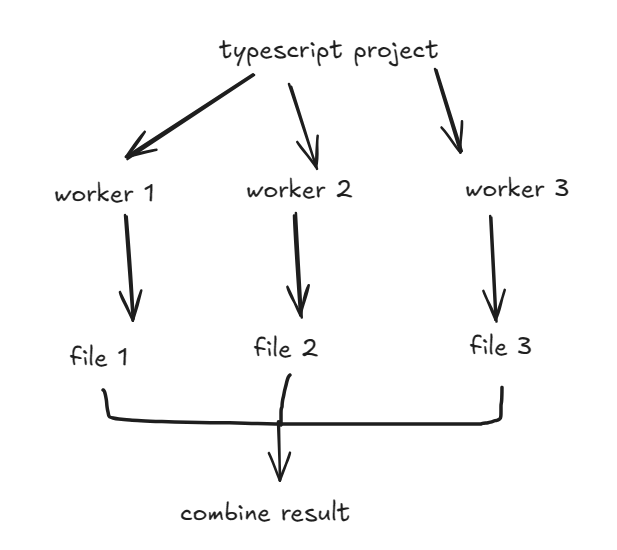
Instead of waiting for one task to finish before starting another, independent work can happen concurrently. That is the basic idea behind parallelization. However, TypeScript's implementation is more interesting than simply assigning one file to each CPU core.
7. How TypeScript 7 uses parallelization
This is where I went back to the official TypeScript 7 announcement. The TypeScript compiler performs several major steps, including:
- Parsing source files.
- Type-checking.
- Emitting output.
Some of these tasks can be distributed across files relatively easily. For example, parsing separate source files is largely independent. Type-checking is more complicated.
Why?
Because files often depend on types declared in other files. They may also share global type information. Running a completely independent checker for every file would result in unnecessary duplicate work and memory usage. The TypeScript team had to approach this carefully.
Multiple type-checker workers
TypeScript 7 uses multiple type-checker workers. Each worker has its own view of the type-checking environment. The compiler divides the work between these workers in a deterministic way, so that the same inputs produce consistent results. An interesting detail from the official announcement is that these workers may duplicate some common work.
That sounds counterintuitive at first.
Why duplicate work when the objective is performance? Because completely independent checkers can avoid certain coordination costs and work with their own checker state. The team has designed the trade-off so that the parallel execution can still improve overall build performance.
The default number of type-checker workers is four. It can also be configured using the --checkers option.
For example:
tsc --checkers 8Using more workers can improve performance on larger projects and machines with more CPU cores. But there is a trade-off: more workers can also increase memory usage. Parallelization is not free. The right balance depends on the project and the machine.
Does everything run in parallel?
No.
This is an important distinction. Not every compiler operation can be safely distributed without considering dependencies and execution order. The TypeScript team has parallelized work where it makes sense, while preserving the consistency of type-checking results.
The official TypeScript 7 announcement discusses this in detail: Announcing TypeScript 7.0 – Custom Scaling: Parallelization and Controls
8. Why did the TypeScript team choose Go?
Go is a compiled language that produces native executables and provides built-in support for concurrency. Its goroutinesand runtime make it practical to coordinate concurrent work across CPU cores. That makes it a suitable foundation for the compiler's new architecture.
But it is important not to confuse two different improvements:
- Native execution means the compiler can run as native code rather than relying on the previous JavaScript-based compiler running on a JavaScript engine.
- Parallelization means the compiler can perform suitable work concurrently across multiple CPU cores.
Both contribute to the performance improvements. Simply moving code to Go does not automatically make every operation parallel. The compiler still needs to identify independent work, manage dependencies, and coordinate its workers. That is the interesting engineering work behind this project.
9. Is TypeScript 7 actually faster?
Yes. And we now have real-world benchmark results rather than just an announcement about future plans. TypeScript 7.0 was officially announced as available on July 8, 2026.
Microsoft reported full-build speed improvements generally ranging from 8x to 12x across the tested projects. Some examples from its published benchmarks:
| Codebase | TypeScript 6 | TypeScript 7 | Improvement |
|---|---|---|---|
| VS Code | 125.7s | 10.6s | 11.9x |
| Sentry | 139.8s | 15.7s | 8.9x |
| Playwright | 12.8s | 1.47s | 8.7x |
These are impressive numbers, particularly for large codebases. It is worth noting that these are compiler and development-tool performance improvements.
They do not mean the JavaScript application running in a browser will automatically execute 10 times faster. The improvements are primarily about compiling, checking, and working with TypeScript projects.
The original announcement and benchmarks are available here: Announcing TypeScript 7.0
10. What does this mean for developers?
For me, the interesting part is not just the reduction in build time. Think about the everyday development experience. When working with a large Angular application, we frequently depend on TypeScript for:
- Finding errors while writing code.
- Understanding function signatures.
- Auto-completion.
- Finding references across modules.
- Renaming variables and methods safely.
- Navigating complex type definitions.
- Checking the entire project before a build.
These features depend on the compiler and language service understanding our project. As applications grow, the amount of information that needs to be processed also grows. A faster compiler and language service can make these interactions more responsive. It also creates more room for richer developer tooling and tools that need access to detailed information about a codebase.
That is a much bigger opportunity than simply running tsc faster.
11. Final thoughts
I started this exploration with two TypeScript keywords while working on dynamic forms. I wanted to understand whether I should use type or interface, and whether one was better than the other from a performance perspective. That question took me into the compiler's source code, type-checking logic, native compilation, Go, and parallelization.
There are a few things I am taking away from this:
typeandinterfaceare not interchangeable in every situation, even though they can describe the same basic object structure.- Performance differences are more about the complexity of the type relationships than the keyword itself.
- TypeScript's compiler does a lot more work than we usually think about when writing a type annotation.
- TypeScript 7's native port uses Go, native execution, and shared-memory parallelism to improve compiler and tooling performance.
- Parallelization is not simply running every file independently. It requires careful handling of dependencies, shared type information, memory, and consistency.
I enjoy these kinds of explorations because they change how I look at tools I use every day. Sometimes, a small question in the code takes you much deeper into the engineering behind the technology. And that is exactly what happened here.
Frequently asked questions
Is type or interface better in TypeScript?
Neither is universally better. Both can describe object structures. Interfaces are useful for extensible object contracts, while type aliases support unions, intersections, primitives, tuples, and advanced type operations.
Is interface faster than type in TypeScript?
Not in every situation. Simple object definitions have broadly similar performance. Interface extension can be more efficient than complex intersections in certain scenarios, but the actual type structure matters more than the keyword alone.
What is checker.ts in TypeScript?
checker.ts is a central source file in the original TypeScript compiler implementation. It contains much of the logic responsible for type resolution and checking compatibility between types.
Why is TypeScript being ported to Go?
The native port aims to improve compiler and language-service performance by using native execution, better memory efficiency, and parallel processing across CPU cores.
What is parallelization in TypeScript 7?
TypeScript 7 can distribute suitable compiler operations, including parsing, type-checking, and emitting, across multiple workers. This allows parts of a build to execute concurrently rather than relying entirely on sequential processing.
Does TypeScript 7 make JavaScript applications run faster?
Not directly. Its primary improvements are in TypeScript compilation, type-checking, and development tooling. It does not automatically make the generated application's runtime logic faster.
References
- interface
- ts-compiler
- types
- typescript
- typescript-7